Forum Categories
Quick to Target
Browse Categories
Community & Help

I’m getting a plotter....

1534 Posts Recent Started
Wednesday, January 17, 2024 at 12:43 PM
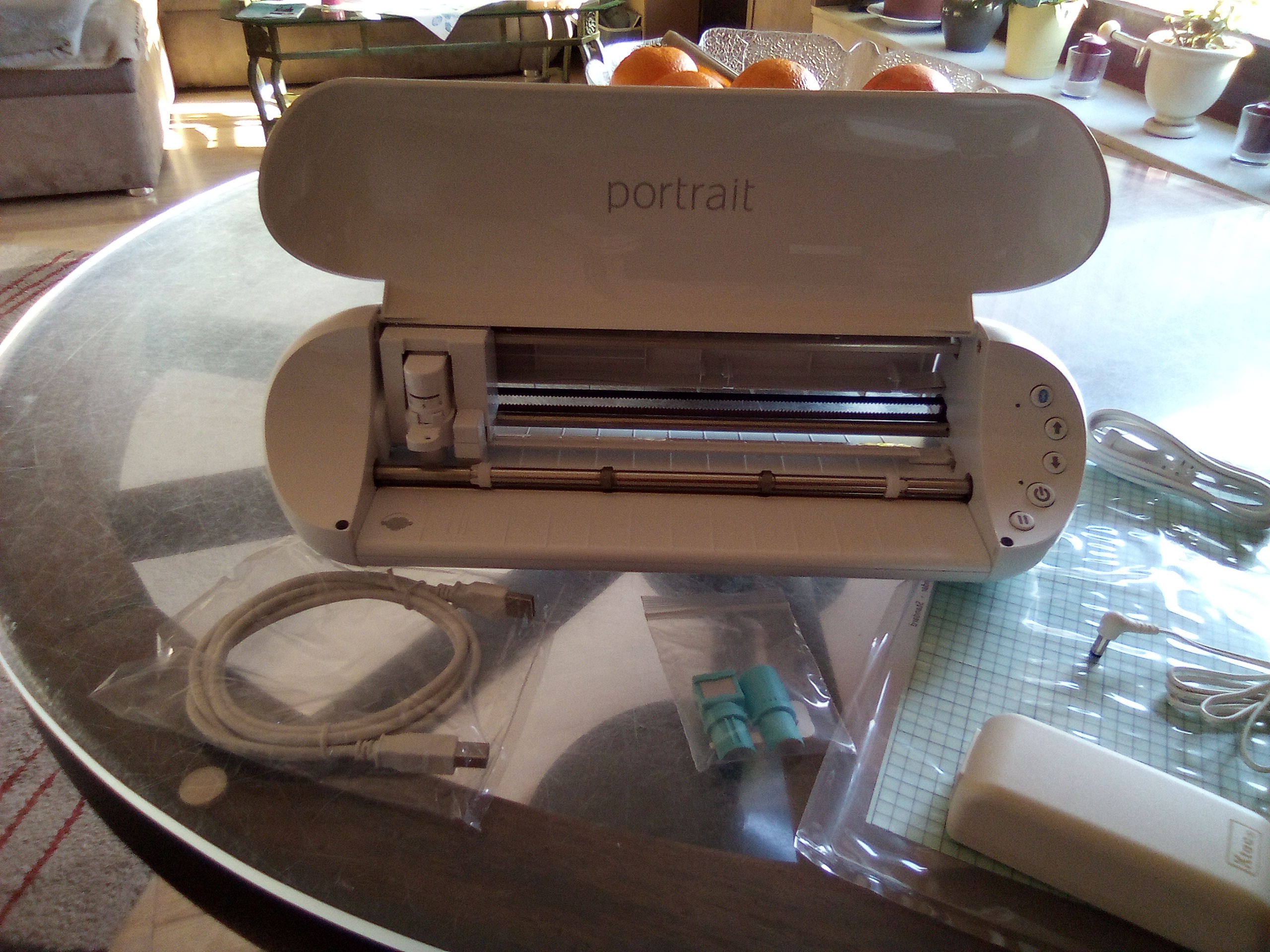
After a lot of thinking, watching videos, and so on—trying to figure out which one I actually needed—I bought one today. It came with a few supplies, too.... I’m soooo excited about the plotter.
I’d actually been saving up all last year, only to find out that the “object of my desire” suddenly cost almost 100€ more at the start of the new year. So I had to find an alternative.
Now I can cut out my paper projects, work with iron-on vinyl, and even design my own stickers....
If anyone has any tips and tricks to share 😁
Bring them on! 

9224 Posts Recent Started
Wednesday, January 17, 2024 at 1:28 PM
Awesome.

I hope you’ll show off your plotter and share your experiences here in this post. It would be really interesting for me—maybe it’ll help me decide whether to get one or not. 

3414 Posts Recent Started
Wednesday, January 17, 2024 at 2:43 PM
Hi Steffi,

which plotter did you end up choosing?
I’ve had a Brother for a few years now and really enjoy working with it.
If you plan on doing a lot of work with textiles, I definitely recommend getting a heat press. You can never get the right pressure or the exact temperature for the transfers with just an iron.

Best wishes, and have fun! 

3942 Posts Recent Started
Wednesday, January 17, 2024 at 2:47 PM
Congratulations! A friend of mine has one and makes really great things with it; I’ve already ironed a few designs onto T-shirts myself.

1534 Posts Recent Started
Wednesday, January 17, 2024 at 2:56 PM
Just got the shipping confirmation 🥳
It’s just a small one, the “Silhouette Portrait 3”… A4 size is more than enough for me.... I’m just going to let my creativity run wild. I already have tons of paper craft patterns—I can have the plotter cut them all out for me... I also ordered sticker film and transfer film right away.... The iron-on film will have to wait a bit. But hey, then I could finally get a pair of jeans exactly to my taste and won’t have to hear “that’s not in demand right now” at the store anymore... 

3414 Posts Recent Started
Wednesday, January 17, 2024 at 3:01 PM
Instead of expensive transfer film, you can also use book cover film. Or, for small items, even Scotch tape.

Have fun!

1534 Posts Recent Started
Wednesday, January 17, 2024 at 3:44 PM
🤷 I should’ve known that before it hopped into my cart 😁
  Do you have “real” weeding tools? I just bought a “pen-like thing”—in a video, someone “modified” an old ballpoint pen by simply replacing the refill with a needle...
There are so many accessories out there—squeegees, brushes, rollers, etc... I already have tweezers and the like here among my craft supplies. 

5960 Posts Recent Started
Wednesday, January 17, 2024 at 4:53 PM
What do you even need a plotter for?

Dear Steffi, if you’ve had your eye on this machine for so long, then congratulations on your purchase. It’s certainly a great addition for a versatile hobbyist.

You want to let your creativity run wild with it. I’d love it if you’d show us what you’ve actually made with it sometime.

Best regards, Ina

1534 Posts Recent Started
Wednesday, January 17, 2024 at 5:16 PM
A plotter.... Basically, a cutting machine....
  Send a file from your tablet to the plotter, and it cuts the whole thing out for you. Now I don’t have to cut my “paper lanterns” by hand anymore. And I can create my own designs on my tablet or PC, then have them printed and cut....
Since it’s already “on its way” and the mail is really fast right now... with a little luck, it’ll be here tomorrow 

3414 Posts Recent Started
Wednesday, January 17, 2024 at 5:26 PM
For weeding, I use those “tartar removers” like the ones dentists use. You can get them for a bargain price at the big “A” store, for example. As soon as it says “weeding tool,” the price goes up accordingly 🤷‍♀️
And my plotter comes with a little “squeegee” for smoothing out the vinyl. But a flat wooden stick (like an ice cream stick) or a plastic one works just as well.

1534 Posts Recent Started
Wednesday, January 17, 2024 at 6:36 PM
So, I have this squeegee among my paper crafting supplies—I use it to smooth out fold lines.... If I’d bought a set like that, it would’ve cost me over 20€ right off the bat. I’d rather buy paper with that money... I can get quite a lot of paper for that price 😁

56 Posts Recent Started
Wednesday, January 17, 2024 at 7:44 PM
First of all, congratulations on the plotter. A machine like that is really great. I’ve had a Silhouette Cameo for 10 years now and I’m still thrilled with it. If you had the time—which you never do—you could make so many amazing things with it…

Instead of buying new cutting mats, I make my own out of window film (4 mm) and a spray adhesive with light tack (removable).

1534 Posts Recent Started
Wednesday, January 17, 2024 at 8:09 PM
Thanks for the tip....
A cutting mat is included in the package....
I doubt I’ll be able to sleep tonight. Just like a kid waiting for Christmas 😂
I’m soooo excited.... 

3514 Posts Recent Started
Wednesday, January 17, 2024 at 9:49 PM
Hey Steffi,
congratulations on your new purchase—you’d already hinted at it.
Look at all the “machines” you have at home. Though I’m not really sure what you do with a plotter like that.
Can you use it to sort of “laser-cut paper” (delicate designs), or am I way off? Making stickers sounds great. I’m sure you’ll show us your first attempts—please do.

Well then, have a peaceful night 😄👍

1534 Posts Recent Started
Wednesday, January 17, 2024 at 10:05 PM
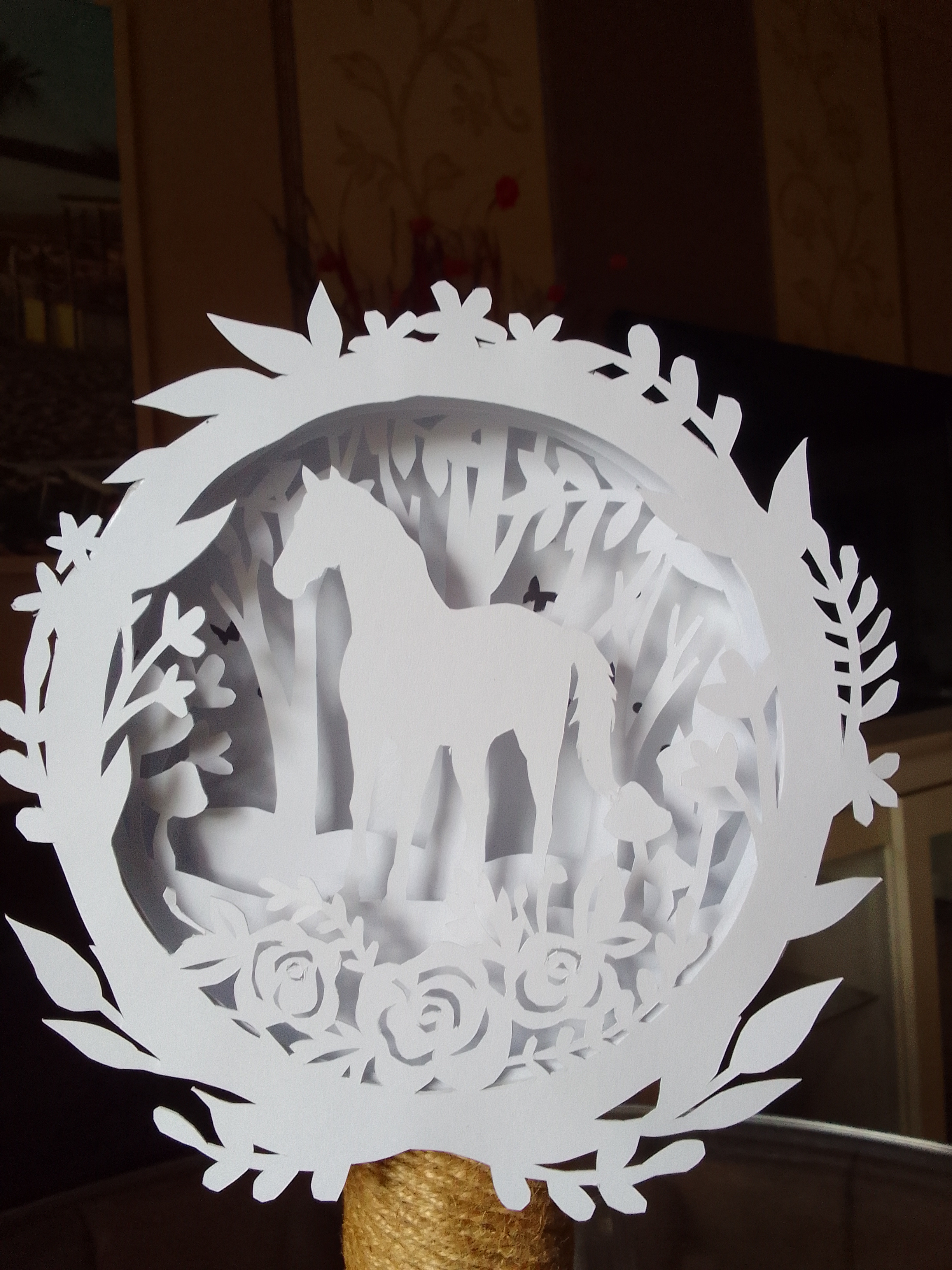
The plotter can cut this lantern, for example... 
It comes out much “neater” than cutting it out by hand, like here... 

391 Posts Recent Started
Thursday, January 18, 2024 at 10:34 AM
Congratulations 😊😊
I’m also thinking about whether I should buy a plotter..... 

5179 Posts Recent Started
Thursday, January 18, 2024 at 12:21 PM
I’d like to join in the congratulations and add my own question: Do the files have to be in specific formats for a plotter to cut them, or can you prepare a PDF or JPG file yourself for the plotter?

1534 Posts Recent Started
Thursday, January 18, 2024 at 1:14 PM

It’s arrived.... 🥳
Thanks for the congratulations so far....

From what I know so far, I can cut all my SVG files with the Silhouette. I can import JPEG and PDF files into Silhouette’s Design Studio and edit them there. At least, that’s how it was shown in a few videos.... But I’ll have to figure out the “Design Studio” on my own first....
I’ll let you know how it goes 😊

5179 Posts Recent Started
Thursday, January 18, 2024 at 1:40 PM
Oh, okay, thanks in advance!
Have fun with your new toy!

1534 Posts Recent Started
Thursday, January 18, 2024 at 10:20 PM
Hi everyone... 
I’ve now registered the plotter on the Silhouette website. There was a “coupon”—I get to pick out designs from the shop for about €20 for 30 days.... 
And on my very first try, I didn’t adjust the blade properly and ended up cutting right through the paper and into the mat 🙈 Darn....
The second try went much better. Although next time I’ll have to enlarge the template significantly—the pieces are too tiny to cut with the plotter. 
And I think it’s pretty “loud.” I wonder if mine is the only one that’s this loud 🤔
Tomorrow morning I’ll be “alone” at home 😁 so I can tinker around in peace.... And veeeery important when setting up the “job”: do a test cut. Otherwise, it’ll cut too deep or not deep enough.  It’s great that I can save the settings there. Which paper should be cut with which thickness setting...
Tomorrow I’ll print a birthday card... 
Let’s see if I can edit a PDF file—it’s supposed to work 😉 
Now I’ll just take the dog out for a quick walk and then off to bed (the dog has his own bed) 😁

9224 Posts Recent Started
Friday, January 19, 2024 at 6:53 AM
Good morning, have lots of fun (and success) this morning.

I'm very curious to hear what you (and perhaps others) report.

I'm also one of those people who are considering getting a plotter 😊 and I'm looking forward to more experience reports and, above all, pictures of your work. 

3414 Posts Recent Started
Friday, January 19, 2024 at 8:02 AM
Good morning!

Very important: designs that are too small or intricate won’t work. They’ll tear when you’re weeding them, if not already during cutting. And—if your plotter allows it—for particularly detailed cuts, reduce the speed and the pressure it’s working with.
Otherwise, the rule is: the best way to learn is by doing 😉
Have fun! 

1534 Posts Recent Started
Wednesday, January 24, 2024 at 7:04 PM
....my new blade is coming tomorrow.... 🙈
Since I cut not only through the paper but also into the mat on my very first cut.... the blade just wouldn’t work anymore....
So....
—too delicate/too small won’t work
—and you have to pay special attention to the setting for “which” material you’re cutting. Always start by doing a test cut to figure out the right settings 😁

Starting tomorrow, I’ll finally get to use the plotter. 👍😁

1534 Posts Recent Started
Saturday, January 27, 2024 at 4:49 PM
....I spent a full three hours today figuring out why the plotter wasn’t cutting. I’d already gotten fed up with it and shoved it back in the closet, but eventually it just wouldn’t let me rest. So I looked online again to see what the problem might be. Until I noticed... The blade setting—where is the “red dot” supposed to be when the setting is supposed to be automatic? 🤔 So I took everything out again, plugged it back in, and lo and behold, the automatic blade hadn’t adjusted itself. Found the problem. I can also adjust it manually, though, and now it’s working. 😁 And I have a spare blade lying around here..... 

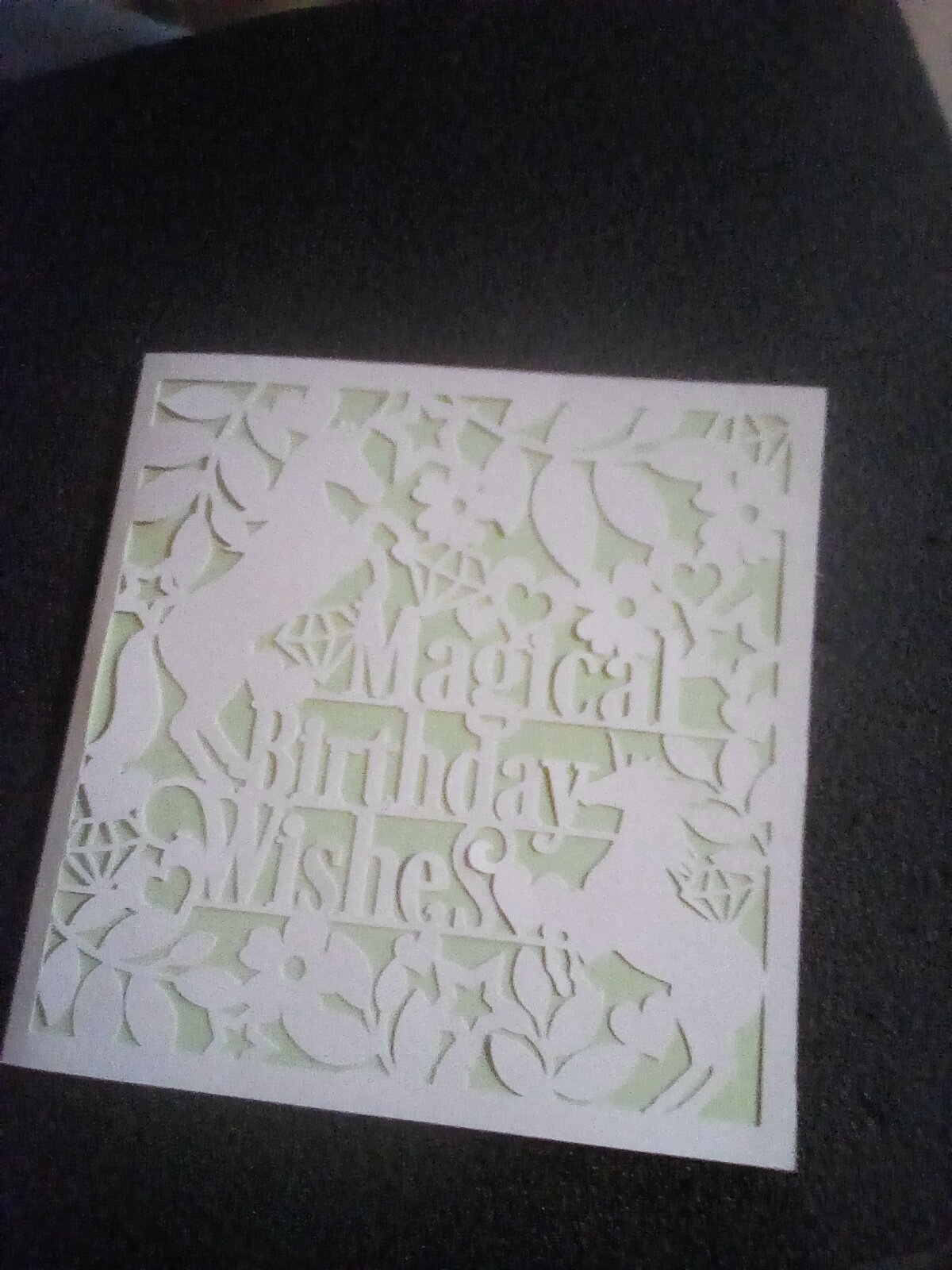
So here’s my first “test project”....
A birthday card 

5179 Posts Recent Started
Saturday, January 27, 2024 at 5:20 PM
That looks really good!

1534 Posts Recent Started
Saturday, January 27, 2024 at 5:26 PM
Thank you....

5960 Posts Recent Started
Saturday, January 27, 2024 at 5:43 PM
That looks awesome! You could never cut that with scissors. It’s really great to have a machine for these intricate cuts. But of course, everything takes learning, exploring, and experimenting. Just owning the machine isn’t enough—you have to get to know it. But that’s also part of the fun; it’s how we keep growing and can keep spinning our creative ideas further.

I hope you continue to have lots of fun with your little plotter. I’m sure you two will become best friends.

Best wishes, Ina

22 Posts Recent Started
Monday, February 5, 2024 at 9:58 AM
I’ve had the same plotter since December, but I still haven’t figured out where to place the vinyl/the mat so that it cuts on the vinyl and not next to it on the mat. Do you have any advice for me? I’m really at my wits’ end.
  I hope you have lots of fun and plenty of creative time to experiment and make things!
P.S. Mine is pretty loud, too—I guess that’s typical!
Warm regards, Kira 

1534 Posts Recent Started
Monday, February 5, 2024 at 10:17 AM
I actually cut through the mat on my very first cut 🙈

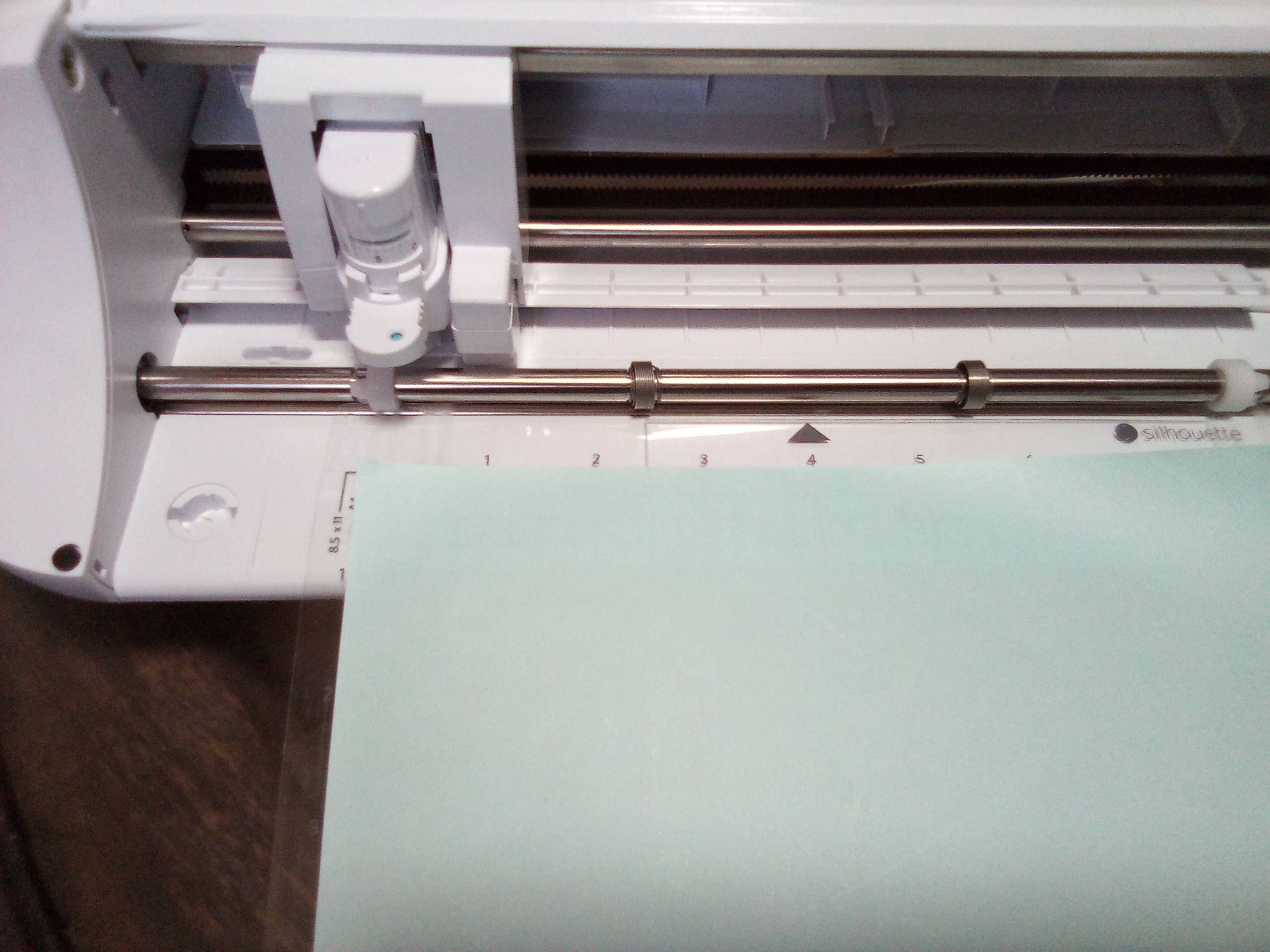
And then just press the up arrow once.... I almost exclusively cut A4 paper.
  It’s really important to position the mat at the second mark—otherwise, the mat will block the automatic settings 😜.
Now that it’s sitting here anyway 🤔, it might as well “do some work” 😁.
I got a file for table lanterns this morning. 

3414 Posts Recent Started
Monday, February 5, 2024 at 10:18 AM
Hi Kira,

I have a Brother Scan’n’Cut, but maybe your Silhouette has a scan function too?
When I’m cutting something but only have a small piece of vinyl that doesn’t even come close to covering the entire cutting mat, I can scan it first and then position the cutting area accordingly.

LG

1534 Posts Recent Started
Monday, February 5, 2024 at 10:40 AM
I can adjust the settings on my tablet or laptop—like resizing and then moving the design around so it fits....
   Right now, I can only work through the app, which really limits my options. My old laptop isn’t compatible with “Design Space”—the editing program—and I just can’t get Windows 10 to install on it 🤷😕
But that’s how it is for now.... The basic settings also work on the tablet and through the app.... 

22 Posts Recent Started
Monday, February 5, 2024 at 2:26 PM
Oh, thank you so much! I’ll give that a try. When viewed from the left, it has several raised areas—kind of like guide lines—but I could never figure out which ones to align the mat and the foil with!

22 Posts Recent Started
Monday, February 5, 2024 at 2:28 PM
I feel exactly the same way—I have Windows 11, and for some reason it doesn’t like it. So far, I’ve only been working through the app and sticking the transfer sheet onto the checkered adhesive area. And then comes the alignment part, and that’s where it gets tricky.....

22 Posts Recent Started
Monday, February 5, 2024 at 2:30 PM
Oh, I’ll have to see if that works for me too! Thanks so much for the tip! 

Write Reply

Please register or Log in!

Latest comments

60 actual comments last by Schnuckelina
7 actual comments last by Schnuckelina
1 actual comment last by WollwunderPetra
93 actual comments last by Silvia1967
70 actual comments last by Silvia1967
104 actual comments last by Moderator
102 actual comments last by Moderator
3 actual comments last by Haekelreigen

Popular patterns

Top patterns from Natalija from the Crochet category!
Top patterns from MorbenDesign from the Crochet category!
Top patterns from stricken-im-trend from the Crochet category!
Top patterns from stricken-im-trend from the Knitting category!
Top patterns from MorbenDesign from the Crochet category!
Top patterns from stricken-im-trend from the Crochet category!
Top patterns from Tory-Pace from the Crochet category!
Top patterns from elke-eder from the Crochet category!
Top patterns from made-by-anja from the Crochet category!
More top patterns

Free patterns

Top patterns from MorbenDesign from the category!
Top patterns from jennysideenreich from the category!
Top patterns from MorbenDesign from the category!
Top patterns from Hobbii from the category!
Top patterns from MorbenDesign from the category!
Top patterns from Hobbii from the category!
Top patterns from Miralay from the category!
Top patterns from MorbenDesign from the category!
Top patterns from Hobbii from the category!
Top patterns from Dianas-kleiner-Haekelshop from the category!
Top patterns from MorbenDesign from the category!
Top patterns from Hobbii from the category!
Top patterns from NataliSkill from the category!
Top patterns from KuemaTutorials from the category!
Top patterns from christina-lemberger from the category!
Top patterns from Hobbii from the category!
Top patterns from ternuraamigurumi from the category!
Top patterns from Hobbii from the category!
Top patterns from KleinesFeines from the category!
Top patterns from martina-supova from the category!
Top patterns from LEOmuster from the category!
More free patterns

Win shopping credit every month!

42 prizes / total value €300: 30×€5, 10×€10, 2×€25 – simply activate the newsletter. No purchase necessary. Unsubscribe at any time. Prizes are awarded as Crazypatterns shopping credit. Learn more