Forum Categories
Quick to Target
Browse Categories
Community & Help

Help—how do I post photos in the forum?

406 Posts Recent Started
Tuesday, July 8, 2014 at 10:05 AM
Hi,

I’m having the following problem right now:

I’d like to write a forum post—preferably with a photo.

I’m probably making this more complicated than it needs to be *blush*—there’s an “Image” feature, so it should be possible somehow, but I just can’t figure it out.

Can anyone give me a tip?

A huge “THANK YOU”

in advance, Nici

449 Posts Recent Started
Tuesday, July 8, 2014 at 10:38 AM
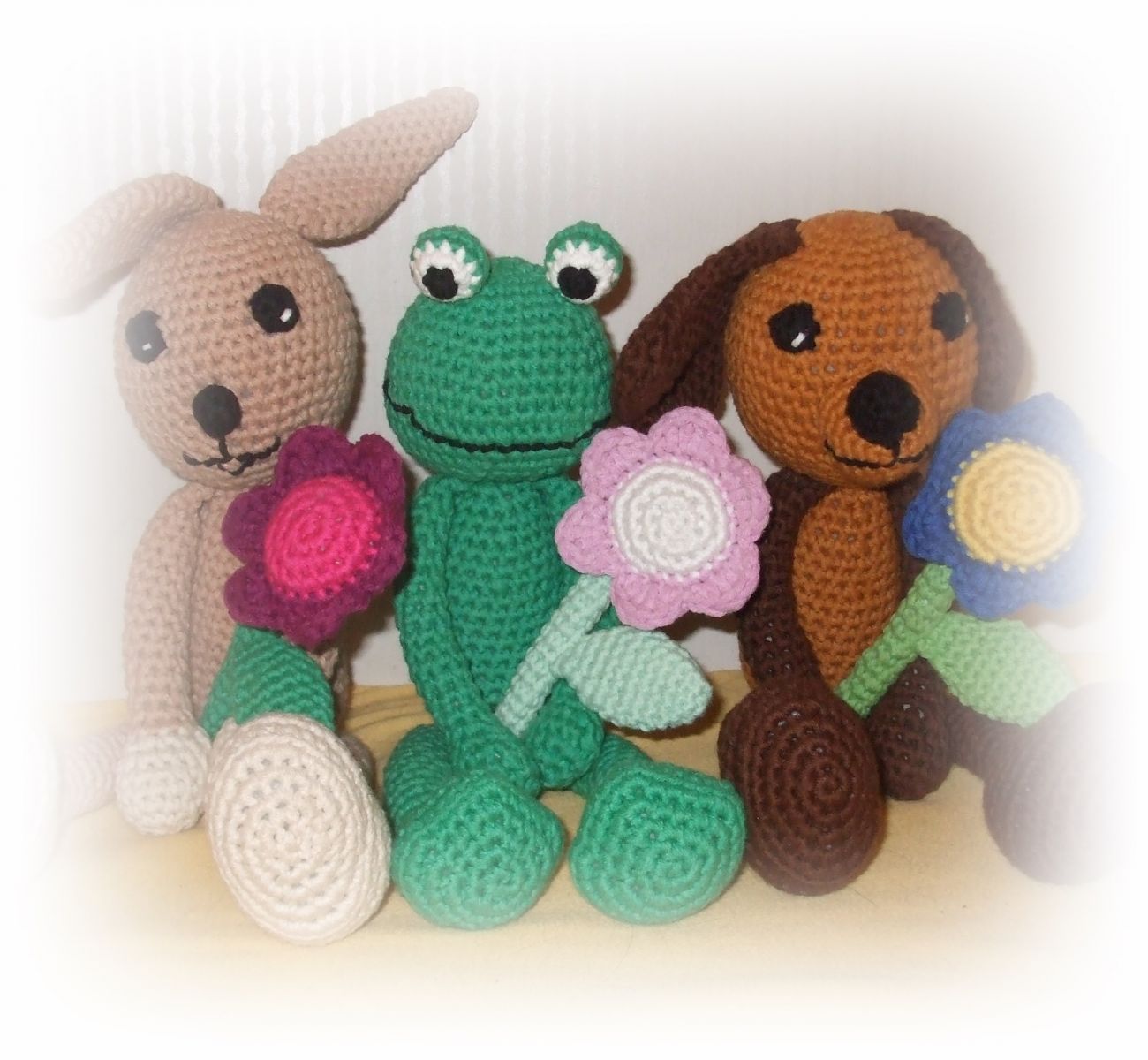
The image you want to insert must already be uploaded somewhere on the internet (image galleries or similar).
Then you take the image URL and paste it into the image button. You can get the image URL by right-clicking the image you want and then selecting Copy Image Address.

An example:


Then the image will appear directly in your post.

Best, Mario

231 Posts Recent Started
Tuesday, July 8, 2014 at 10:40 AM
Direct uploading works too, just not in all browsers. Internet Explorer doesn’t work, but Chrome does, as far as I know.

449 Posts Recent Started
Tuesday, July 8, 2014 at 10:40 AM
And of course, on the image button: right-click and select “Paste.”

231 Posts Recent Started
Tuesday, July 8, 2014 at 10:45 AM
Yes, direct uploading works in Chrome, but unfortunately, in IE, the button that lets you select an image from your computer isn’t available.


2800 Posts Recent Started
Tuesday, July 8, 2014 at 10:52 AM
Hello Nici,

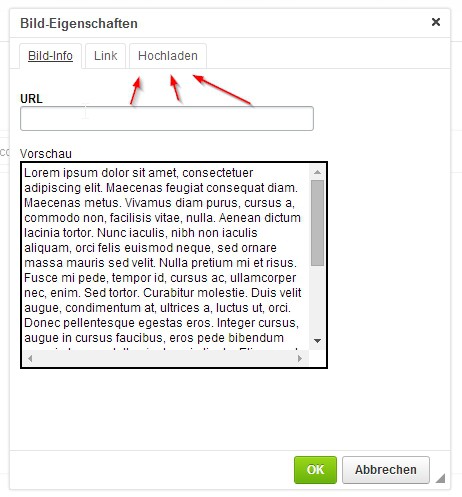
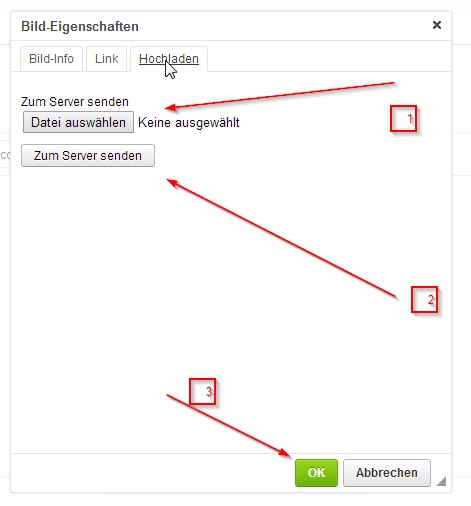
I hope the following 3 images help you. 

1.) Click the "Image" button


2.) In the dialog window, click "Upload" (I use Chrome)


3.) Click "Choose File" (the text may vary); select the file; click "Send to Server" and then "OK".


Best regards
Alexander

449 Posts Recent Started
Tuesday, July 8, 2014 at 11:04 AM
Firefox works too—I completely overlooked the top bar.

406 Posts Recent Started
Tuesday, July 8, 2014 at 11:26 AM
Ahhhhhaaaaa, thanks for your replies.

Since I’m unfortunately using Internet Explorer, I guess I’ll have to upload my pictures some other way first. Then I’ll try again…

Best regards, Nici

231 Posts Recent Started
Tuesday, July 8, 2014 at 11:50 AM
Hi Alexander,

unfortunately, the “Select File” button (No. 1) isn’t displayed in IE :-(. It’s an annoying bug, since the majority of Internet users still use IE to go online.

Best regards,
Maike

406 Posts Recent Started
Wednesday, July 9, 2014 at 7:24 AM
Hello and good morning,

it still isn’t working for me :-(

Either I’m being really toooooooooooooootally clumsy, or my IE just won’t do it.

Here’s what I’m doing:

I click the “Image” button,
go to “Image Info,” and paste my URL into the box with a right-click,
then click “Upload” and select “Send to Server.”
And then nothing happens. I can also click “OK,” and nothing happens.
What’s really annoying is that even when I click “Cancel,” nothing happens at all. My background turns pale, and the only thing I can do is use the image options. I can only get rid of that “Image” box by completely closing my browser. Could it be that it takes that long for the image to upload? But I’ve been waiting for an hour now.
Has anyone ever solved a similar problem?

Thanks so much for your help

Nici

231 Posts Recent Started
Wednesday, July 9, 2014 at 8:10 AM
Hello and good morning to you too.

I’m also having various problems uploading images with IE. Right now, there’s only one thing that helps: use a different browser for this. That’s the only solution I can think of at the moment.

Best regards,
Maike

406 Posts Recent Started
Wednesday, July 9, 2014 at 8:33 AM
[Image removed] New attempt
Nope, this time it doesn’t work with Firefox either.
All that appears is a page with a box where I can enter the URL, and when I click “Preview,” a big red X appears.

Let’s see if I have Chrome too...

406 Posts Recent Started
Wednesday, July 9, 2014 at 8:36 AM

406 Posts Recent Started
Wednesday, July 9, 2014 at 8:37 AM
OK =D seems to be working *oh, how nice*, finally
Is there a way to make it even smaller?

From now on, I’ll just use Chrome


449 Posts Recent Started
Wednesday, July 9, 2014 at 9:29 AM
It’s best to resize the image to the desired size beforehand (change the resolution).
But then the quality will be lower. I’d leave it as is—at least you can still make out what’s in it.

2800 Posts Recent Started
Wednesday, July 9, 2014 at 10:56 PM
As soon as we have a little breathing room, we’ll expand the forum features. I hope we’ll be able to crop images right here then.

Write Reply

Please register or Log in!

Latest comments

3 actual comments last by Libelle11
12 actual comments last by franziska-nix-lissmeier
20 actual comments last by Moderator
6 actual comments last by Libelle11
24 actual comments last by Libelle11
5 actual comments last by Schnuckelina

Popular patterns

Top patterns from Natalija from the Crochet category!
Top patterns from MorbenDesign from the Crochet category!
Top patterns from elke-eder from the Crochet category!
Top patterns from stricken-im-trend from the Crochet category!
Top patterns from NiggyArts from the Crochet category!
Top patterns from stricken-im-trend from the Crochet category!
Top patterns from stricken-im-trend from the Knitting category!
Top patterns from stricken-im-trend from the Crochet category!
Top patterns from elke-eder from the Crochet category!
More top patterns

Free patterns

Top patterns from MorbenDesign from the category!
Top patterns from jennysideenreich from the category!
Top patterns from MorbenDesign from the category!
Top patterns from Hobbii from the category!
Top patterns from MorbenDesign from the category!
Top patterns from Miralay from the category!
Top patterns from Hobbii from the category!
Top patterns from MorbenDesign from the category!
Top patterns from Hobbii from the category!
Top patterns from MorbenDesign from the category!
Top patterns from christina-lemberger from the category!
Top patterns from Dianas-kleiner-Haekelshop from the category!
Top patterns from KuemaTutorials from the category!
Top patterns from Hobbii from the category!
Top patterns from NataliSkill from the category!
Top patterns from ternuraamigurumi from the category!
Top patterns from Hobbii from the category!
Top patterns from martina-supova from the category!
Top patterns from DIY-4U from the category!
Top patterns from Hobbii from the category!
Top patterns from LEOmuster from the category!
More free patterns

Win shopping credit every month!

42 prizes / total value €300: 30×€5, 10×€10, 2×€25 – simply activate the newsletter. No purchase necessary. Unsubscribe at any time. Prizes are awarded as Crazypatterns shopping credit. Learn more