
Thumbnails in Facebook links are incorrect
Support and Help
Translated
Reply
Support and Help
Translated

6226 Posts
Recent
Started
Tuesday, August 11, 2015 at 12:33 AM
Dear Josefa,
today I wrote my first blog post. It wasn’t nearly as hard as I thought it would be. It’s a free crochet pattern for a lantern. I wanted to post the link to the blog post on my Facebook page so my fans could access the pattern and share it with their friends. But that only makes sense if the thumbnail—namely, the lantern—matches the link. And that’s the problem. Facebook automatically inserts the wrong image. What can I do to get the lantern image to appear in the link? Do you have any ideas?
Thank you in advance for your help.
Best regards, Ina

1240 Posts
Recent
Started
Tuesday, August 11, 2015 at 12:48 AM
Hi.... we’ve discussed this before. The problem is well-known. I’ll see if I can find the post.
1240 Posts
Recent
Started
Tuesday, August 11, 2015 at 12:51 AM
6226 Posts
Recent
Started
Tuesday, August 11, 2015 at 1:57 AM
Oh, thank you so much. That’s exactly what I wanted to know. I’ll try it out first thing tomorrow. Thank you.
Best regards and good night—Ina
Best regards and good night—Ina
6226 Posts
Recent
Started
Tuesday, August 11, 2015 at 9:20 AM
Good morning, Nicole, it worked! Thank you for the quick tip last night. Best regards, Ina
1240 Posts
Recent
Started
Tuesday, August 11, 2015 at 10:10 AM
Here you go

1 Post
Recent
Started
Monday, January 25, 2016 at 1:20 PM
Unfortunately, the link is no longer accessible. Does anyone else know how to solve this problem?

922 Posts
Recent
Started
Monday, January 25, 2016 at 1:24 PM
You can select the images you want to use. Below your post, there’s a window listing all the images. There, you can delete the ones that don’t fit and, if necessary, upload a completely different image.

2900 Posts
Recent
Started
Monday, January 25, 2016 at 1:54 PM
Hi Manny,
the post above is only accessible to authors. Here is the answer (quoted from the above-mentioned post):
--- Quote ---
In summary:
1. Copy the link
2. Possibly write a few lines
3. If the wrong image appears, click ON THE IMAGE - then "Upload image/Change" will appear
Done
--- End of quote ---
Best regards
Alexander

438 Posts
Recent
Started
Monday, January 25, 2016 at 2:12 PM
Unfortunately, this doesn’t work for me. I go to Status, paste the link—and three incorrect thumbnails appear. I can click on them until I’m blue in the face, but no “Upload Image—Change” option appears. And when I go to “Insert Image” at the top, the likes don’t count. It’s a real pain......
438 Posts
Recent
Started
Monday, January 25, 2016 at 2:18 PM
Now I’ve also tried inserting the photo using the little camera icon in the bottom corner, but again, only the photo gets shared, not the link. Even though I clicked on “Status.”
2900 Posts
Recent
Started
Monday, January 25, 2016 at 2:34 PM
I’m happy to help :-)
Once you’ve pasted the link into the status window, deselect the three suggestions and upload an image (see screenshot).
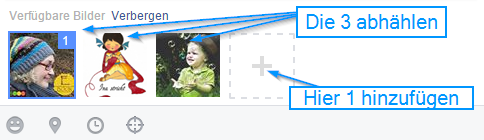
P.S. Please ignore the mistake in the screenshot (“abhählen” should be “abwählen”).
Best regards
Alexander
Once you’ve pasted the link into the status window, deselect the three suggestions and upload an image (see screenshot).
P.S. Please ignore the mistake in the screenshot (“abhählen” should be “abwählen”).
Best regards
Alexander
438 Posts
Recent
Started
Monday, January 25, 2016 at 2:47 PM
Thanks for trying so hard, Alexander, but I’ve already tried that. As soon as I deselect the second thumbnail, the three incorrect ones appear, and I can’t get rid of them.
2900 Posts
Recent
Started
Monday, January 25, 2016 at 3:18 PM
Please check Facebook here: https://www.facebook.com/help/333140160100643/
I hope you find the right answer there.
Best regards
Alexander
I hope you find the right answer there.
Best regards
Alexander
438 Posts
Recent
Started
Monday, January 25, 2016 at 3:35 PM
Unfortunately not—I’ve already tried everything. I give up.
Latest comments

17 actual comments last by Frieda-Wollknaeuel
18 actual comments last by Eddysmutti

10 actual comments last by WollwunderPetra

1 actual comment last by mama-hathi

5 actual comments last by DIY-Marina

1 actual comment last by Schnuckelina
1 actual comment last by Schnuckelina


18 actual comments last by mama-hathi
2 actual comments last by WollwunderPetra
49 actual comments last by WollwunderPetra

23 actual comments last by claros-design
Currently popular
18 actual comments last by Eddysmutti
49 actual comments last by WollwunderPetra
Popular patterns

Top patterns from elealindadesign from the Crochet category!

Top patterns from Natalija from the Crochet category!

Top patterns from wooly-ways from the Crochet category!

Top patterns from elke-eder from the Crochet category!

Top patterns from KuemaTutorials from the Crochet category!

Top patterns from elke-eder from the Crochet category!

Top patterns from elke-eder from the Crochet category!

Top patterns from Melknits from the Knitting category!


Top patterns from cuttehappytoys from the Crochet category!

Top patterns from elke-eder from the Crochet category!
Free patterns


Top patterns from CrochetGiftsShop from the category!


Top patterns from Dianas-kleiner-Haekelshop from the category!


