Dear community,
we've updated the review section on our product pages. Our goal was to make reviews clearer, fairer, and more useful: when you're interested in a product, you should be able to see at a glance what other users say about that specific product. At the same time, authors should have more clarity about how their product reviews are displayed.
 Product reviews take priority
When a product already has reviews, those reviews now appear clearly as reviews for that specific product. Clicking the rating in the purchase area takes you straight to the review section.
This matters because users mainly want to know:
- How was this specific pattern, file, or product rated?
- Are there helpful notes from real experiences?
Store reviews are still available, but they're no longer mixed in with the product rating.
Two areas: Product and Store
The review section still has two tabs:
- Product: reviews for this specific product.
- Store: reviews from the author's product catalog.
The Product tab is shown first by default. That's where you'll find the rating that matters most for a purchase or download decision.
The Store tab provides additional context. It can be especially helpful when a single product has only a few reviews but the author already offers many other reviewed products.
A clearer summary at the top of the review section
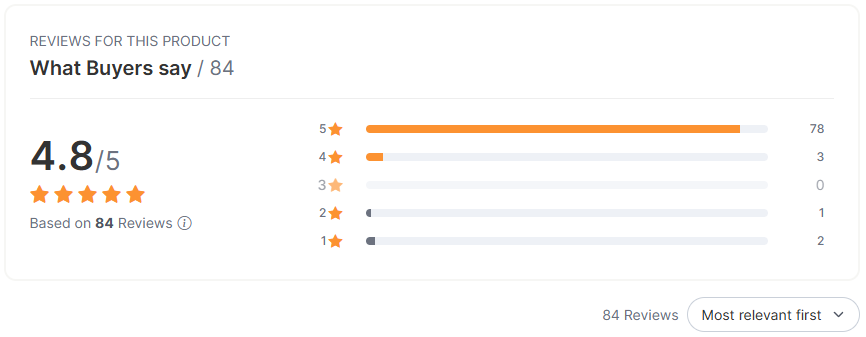
In the Product tab, you'll now see a clearer summary:
- Average star rating
- Number of product reviews
- Star display
- A note explaining what the rating is based on
This summary is based on product reviews — not on store reviews and not on comments.
A short note about trust and verification
Next to "Based on X reviews" there's an info icon. It briefly explains which reviews count.
In short:
- Reviews count after verified use, for example after purchase and download, free download, or a matching video view.
- Reviews refer to the specific product.
- Reported reviews count again normally once they've been resolved.
The note is there to help you understand why the displayed product rating is a more reliable signal.
Star distribution from three reviews
Once a product has at least three product reviews, we show a star distribution.
You'll then see how many reviews gave:
- 5 stars
- 4 stars
- 3 stars
- 2 stars
- 1 star
Rows are clickable when reviews exist for that rating. Rows with no reviews aren't clickable, so filtering won't drop you into an empty result list.
A friendlier experience for new products
New or recently reviewed products shouldn't look weaker just because they only have a few reviews so far.
If a product has one or two reviews but not enough for a meaningful star distribution yet, we show a friendly note instead:
- The first product reviews are in.
- The star distribution will appear once there are three product reviews.
Filter by star rating
You can filter product reviews by star rating.
Examples:
- Clicking 5 stars shows only 5-star reviews.
- Clicking 3 stars shows only 3-star reviews.
- The active filter appears above the list and can be removed there.
This helps you quickly find the experiences that matter most to you.
Sort reviews
Product reviews can now be sorted. The available options are:
- Most relevant first
- Newest first
- Most helpful first
- Highest rated first
- Lowest rated first
This lets you adjust the review list to your own decision-making needs: the latest experiences via "Newest first", possible downsides via "Lowest rated first", or the default view via "Most relevant first".
Load more reviews
When more reviews are available, a button appears to load them. New reviews are added below the existing list, so you don't have to start again from the top.
Individual reviews are easier to read
The display of individual reviews has been improved. You can see, among other things:
- Avatar
- Username
- Star rating
- Date
- Title
- Review text
- Status notes if a review is currently being checked
- Actions for your own review when you're logged in and the review belongs to you
Longer review texts can be expanded.
Reviews under review are marked transparently
If a review has been reported or is currently being checked, it's marked accordingly.
This means:
- The review doesn't simply disappear without explanation.
- Its status is visible.
- It's temporarily not counted toward the overall rating.
This keeps the review display more transparent for everyone involved.
Write your own review
If you're eligible to review a product, you can still write a review. This is possible when actual use can be verified (purchase and download, download of a free product, or a matching video view for video products).
In your review, you can:
- Give 1 to 5 stars
- Write a title
- Describe your experience
- Enable notifications for replies
Once a review is saved, the page jumps to it. If a content check temporarily holds the review back, you'll see a notice.
Edit your own review
If you've already written a review, you can still update the stars, title, or text later if you want to add something or make a correction.
Hide or restore your own review
You can still manage your own reviews. Depending on the current status, you can:
- Hide your own review
- Restore a hidden review
Mark reviews as helpful
Below reviews, you'll still find the question "Was this review helpful?". Logged-in users can vote "Yes" or "No". If you're not logged in, you'll see a login or registration prompt.
Comments and replies
Reviews can still be commented on, but intentionally not by everyone. Comments are mainly intended for:
- the author
- the person who wrote the review
This lets an author respond to a review, and the reviewer can reply. Public discussions by third parties are avoided this way.
Replies from the author are highlighted and labeled "Author".
What does this mean for buyers and users?
Your decision should become easier. You can see more quickly:
- how this specific product was rated
- how many product reviews it has
- how the star ratings are distributed
- what other users actually wrote about it
- whether the author responded to reviews
- which reviews are critical or especially helpful
You can read, filter, sort, and load more reviews.
What does this mean for authors?
For authors, the display is easier to follow. Product reviews are more clearly separated from store context, while store reviews remain visible as additional context in the Store tab.
Authors can still reply to reviews, and those replies are easier for users to recognize.
What happens when a product has no reviews yet?
If a product doesn't have any reviews yet, we no longer show an empty or confusing review area with unnecessary sorting options. Instead, a clear note explains that the product rating, distribution, and review experiences will appear once buyers or users review the product.
For new products, the friendly brand-new note remains visible as well.
In short
The new review section is meant to improve three things:
1. Clarity: product reviews and store reviews are separated.
2. Trust: it's easier to understand which reviews count.
3. Usability: reviews can be filtered, sorted, and read more easily.
We hope the new display helps you make purchase and download decisions while also being fairer for authors.
Best regards,
The CrazyPatterns Team