Quick to Target
Browse Categories
Community & Help

Spring Digital Scrapbooking Downloads

Fresh colors, watercolor flowers, and airy designs give your pages an instant spring feel. Show more
Fresh colors, watercolor flowers, and airy designs give your pages an instant spring feel. Here you’ll find matching downloads like digi paper, elements, and templates. Choose your set and create layouts, cards, or hybrid projects.

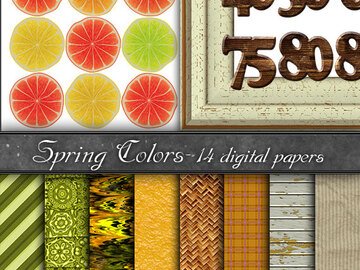
Digital Paper, spring colors

(1)
from US $3.16

Spring Scrapbooking: Colors, Motifs, and Digital Templates

Spring scrapbooking is all about fresh colors, watercolor flowers, and a light, airy look. Whether you want to create layouts for photo albums, cards, or hybrid projects, you'll find versatile designs here, from digital papers to embellishments and templates, in everything from delicate pastels to bold accents.

Quick choice
  • ✓Full kits: Contain coordinated papers, elements, and alphabets, so you can get started right away without spending time searching for matching color combinations.
  • ✓Style: Watercolor looks, pastels, and playful shabby chic are especially well suited to spring.
  • ✓Motifs & Occasions: Flowers, leaves, birds, and rainbows have a timeless appeal. For seasonal highlights, you can also turn to Easter or fresh decorating ideas from the garden.
  • ✓Project type: For notebooks and planners, planner decorating sets are often especially practical because the elements are compact and clearly organized.
What to look out for
  • Resolution (DPI): The standard is 300 dpi, which produces crisp, detailed prints even at 30 × 30 cm (12 × 12 inches). 72 dpi is suitable only for screen viewing.
  • Element shadows: Whenever possible, choose elements without preset drop shadows (no-shadow), so you can set a realistic light direction and depth yourself in your software.
  • File formats: Papers usually come as JPGs, while elements are ideally provided as cut-out PNGs with transparent backgrounds, so you can layer them flexibly over photos and papers.
  • Printables: Special PDF sets are often already arranged on DIN A4 pages to save paper and are especially suitable for print-based craft projects.
Common pitfalls
  • Floating elements: Without a digital drop shadow, flowers, buttons & other elements can quickly look flat. Use shadows intentionally to visually “ground” the layers.
  • Proportions: Scale flowers, birds, and decorations to match the perspective of the photo, or the motifs may look unintentionally oversized.
  • Color accuracy: Bright spring colors (e.g. neon or very light green) often look more intense on a screen (RGB) than in print (CMYK). If in doubt, try a test print.
  • Files & Downloads: If something seems to be “missing” after purchase, the issue is often with unpacking or overlooked subfolders. If needed, use the help guide for Downloading & Unpacking.

Frequently Asked Questions

Popular choices include flowers, leaves, birds, butterflies, rainbows, picnic and garden motifs, and seasonal themes such as Easter.

Check the resolution (dots per inch/DPI) stated in the description and whether the file is offered as a print-ready PDF or a high-resolution graphic.

PNG graphics often have a transparent background, making them easy to layer over photos or papers in your software.

That depends on the license. The permitted uses are listed in the product description; if in doubt, choose a file that expressly allows commercial use.

Win shopping credit every month!

42 prizes / total value €300: 30×€5, 10×€10, 2×€25 – simply activate the newsletter. No purchase necessary. Unsubscribe at any time. Prizes are awarded as Crazypatterns shopping credit. Learn more